
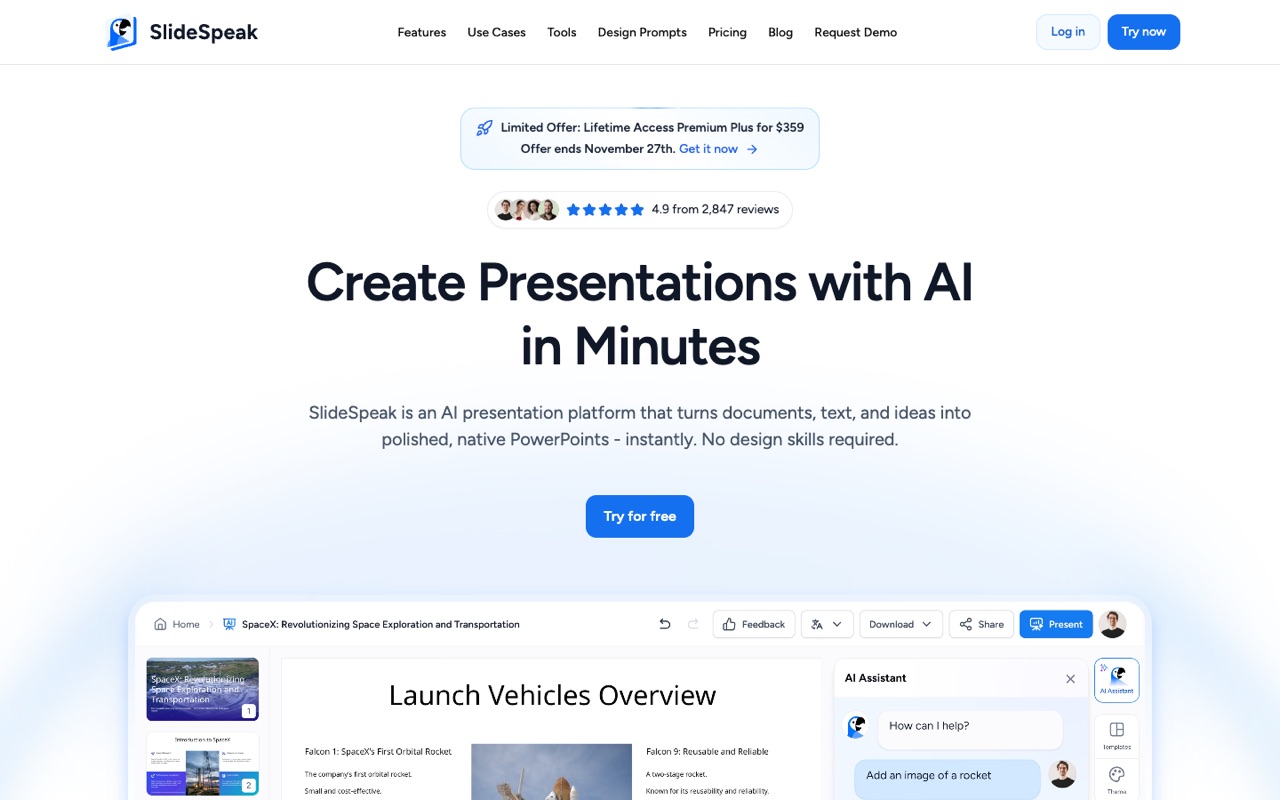
What does SlideSpeak do?
SlideSpeak turns PDFs, Word and Excel files, text or a topic into editable PowerPoint decks, then can narrate them as AI videos, translate them or turn them into quizzes. Premium starts at $24.65/mo billed yearly ($29 monthly), with a free 100-credit plan. It suits people who finish decks in PowerPoint; skip it if you want a canvas-style design tool.
- Documents to slides. Upload a PDF, Word file or Excel spreadsheet, paste text or describe a topic, and SlideSpeak drafts a structured deck; you can also chat with PDF, Word and PowerPoint files to summarize them.
- Native PowerPoint export. Exports real .pptx files with fonts and layouts intact, plus PDF; the homepage also lists export to Google Slides.
- AI assistant Charles. An in-editor assistant that writes and rewrites slide content, adds images, infographics and charts, and can redesign an existing presentation.
- AI video presentations. Turns a deck into a narrated video with voiceover, voice cloning and AI presenters on paid plans, with screen recording and video translation.
- Translation. Translates whole presentations into 150+ languages while keeping layout and formatting.
- Brand kits and custom templates. Apply your fonts, colors and logo across slides (brand kits with custom fonts are on Premium Plus), or upload your own .pptx or .potx template for $129 per template.
- Quizzes and SCORM. Create live quizzes from a presentation and export SCORM packages for a learning management system, from Premium.
- API and automation. The SlideSpeak API generates and edits PowerPoint files from text, documents or JSON; its docs list Zapier, MCP and Make.com as integration options.
Who is SlideSpeak for?
SlideSpeak is a good fit if you're a video creator, a course creator or a team lead, and you need help making presentations.
How much does SlideSpeak cost?
SlideSpeak starts at $24.65/mo. It also has a free plan. We checked this on Nov 22, 2026 on the official pricing page.
- Starts at
- $24.65/mo
- Free plan
- Yes
- Free trial
- Not offered on the pricing page
Premium billed yearly (Save 15%); $29 billed monthly, shown next to a crossed-out $30. Premium Plus is $28.90/mo yearly or $34 monthly. Premium includes 1,000 credits a month and Premium Plus 2,500; the free plan gives 100 one-time credits (about 3 presentations). Enterprise is custom pricing. Prices in USD. Checked Nov 22, 2026.
SlideSpeak plans compared
| Plan | Billed monthly | Billed yearly | What you get |
|---|---|---|---|
| Free | $0 | $0 | 100 credits at sign-up (about 3 presentations, not renewed), share online with viewers or editors, AI assistant Charles, document chat, 50 MB file size limit, 150+ languages |
| Premium | $29/mo | $24.65/mo | 1,000 credits a month (about 27 presentations or 13 AI videos), export to PDF, PPT and more, SlideSpeak AI 5.0, AI video with voice cloning and AI presenters, screen recording and video translation, live quizzes and SCORM export, team workspaces, custom presentation length, 30-day version history, no file size limit, one-time credit top-ups |
| Premium Plus | $34/mo | $28.90/mo | 2,500 credits a month (about 67 presentations or 33 AI videos), everything in Premium plus 90-day version history, brand kits with custom fonts, brand image and icon libraries, design kits with SlideSpeak AI 5.0 |
| Enterprise | Not listed | Custom | Everything in Premium Plus, multiple custom templates, SSO, priority support, custom credit volume; sold through a sales call |
Checked Nov 22, 2026 with WebFetch from a US server on slidespeak.co/pricing (prices in USD), plus the page's own plan data behind the Annual toggle. Monthly prices are $29 (Premium) and $34 (Premium Plus), shown next to crossed-out $30 and $40. Annual billing ('Save 15%') is $24.65/mo and $28.90/mo; the page doesn't print the yearly total. Credits are spent per slide and refresh each billing cycle, so the presentation counts are SlideSpeak's estimates. Top-ups on paid plans: 500 credits for $10, 2,000 for $30 or 5,000 for $50, valid 12 months. Importing your own template costs $129 per template. Verified students get 25% off. A limited 'Lifetime Access Premium Plus' offer for $359 was shown, ending Nov 27, 2026; we list regular prices. API pricing sits on a separate page we didn't read. Each team member needs their own paid plan.
Checked Nov 22, 2026 on SlideSpeak's pricing page. Prices change often, so confirm before you buy.
SlideSpeak pros and cons
What stands out
- Free plan with 100 credits to try it
- Outputs native, editable .pptx files rather than a closed web format
- AI video, translation, quizzes and SCORM export are included from Premium
- Annual billing saves 15%, and top-up credits last 12 months
- Refund available through support chat within 7 days of the first purchase (promotions excluded)
- Works from PDF, Word and Excel files, not only a prompt
Watch out for
- Credits are spent per slide and vary by AI model, so the real number of decks a month can differ from the estimates
- Brand kits with custom fonts need Premium Plus
- Your own template costs an extra $129 per template
- Each team member needs their own paid plan; workspaces don't pool credits
- Free credits are one-time and files are capped at 50 MB
- API pricing isn't on the main pricing page
Based on SlideSpeak's own pages, not hands-on testing.
What are the alternatives to SlideSpeak?
We list 7 other AI Presentations tools: Beautiful.ai, Decktopus AI, Gamma, Office Timeline, Plus AI, Prezi, Visme. Each one below shows its starting price and when you might pick it instead.
 Beautiful.ai · From $14.50/mo
Choose Beautiful.ai if you want a lower starting price ($14.50/mo vs $24.65/mo).
 Decktopus AI · From $9.99/mo
Choose Decktopus AI if you want a lower starting price ($9.99/mo vs $24.65/mo).
 Gamma · Price not checked
Choose Gamma if you'd like a second option to compare for making presentations.
 Office Timeline · From $9/user/mo
Choose Office Timeline if you want a lower starting price ($9/user/mo vs $24.65/mo).
 Plus AI · From $10/mo per user
Choose Plus AI if you want a lower starting price ($10/mo per user vs $24.65/mo).
 Prezi · Price not checked
Choose Prezi if you'd like a second option to compare for making presentations.

SlideSpeak FAQ
How much does SlideSpeak cost?
As of Nov 22, 2026, Premium is $29 a month or $24.65/mo billed yearly with 1,000 credits a month, and Premium Plus is $34 a month or $28.90/mo billed yearly with 2,500 credits. Enterprise is custom pricing. Prices are in USD.
Is SlideSpeak free?
There's a free plan with 100 credits at sign-up, which SlideSpeak estimates is enough for about 3 presentations. The credits don't renew, files are limited to 50 MB, and exporting to PDF and PPT is listed under the paid plans.
How many presentations can I make with SlideSpeak credits?
Credits are spent per slide, and SlideSpeak AI 5.0 costs more per slide than AI 4.0. SlideSpeak estimates about 27 presentations or 13 AI videos a month on Premium and about 67 presentations or 33 AI videos on Premium Plus. Extra credits cost $10 for 500, $30 for 2,000 or $50 for 5,000.
Can SlideSpeak export to PowerPoint and Google Slides?
Yes. SlideSpeak exports native .pptx files with fonts and layouts intact, plus PDF, and its homepage lists export to Google Slides. Export is part of the paid plans.
Does SlideSpeak offer refunds?
Its pricing FAQ says you can message support chat and get a refund within 7 days of the initial purchase; promotional offers are excluded. You can cancel anytime and keep access until the end of the paid billing cycle.
Can my team share SlideSpeak?
Yes. Any paid plan can create a team workspace where presentations, videos, quizzes, brands, fonts and folders are shared. Each member needs their own paid plan and uses their own credits; the workspace itself costs nothing extra.
Is SlideSpeak safe for confidential documents?
SlideSpeak says uploads are processed with encryption and aren't stored permanently after processing, but it also advises caution with highly sensitive files. We didn't find a security certification listed on its homepage or pricing page on Nov 22, 2026.
SlideSpeak vs Gamma: which should I pick?
SlideSpeak is built around native PowerPoint output and adds AI video, translation and SCORM quizzes. Gamma works in its own editor and also makes documents, websites and social posts, exporting to PowerPoint, PDF and Google Slides. We haven't tested either hands-on; this is based on their official pages.
Sources and how we checked
- Official pricing page, checked Nov 22, 2026
- Official website
- SlideSpeak homepage: features and export formats (checked Nov 22, 2026), checked Nov 22, 2026
- SlideSpeak API documentation (checked Nov 22, 2026), checked Nov 22, 2026
- SlideSpeak affiliate program (checked Nov 22, 2026), checked Nov 22, 2026