
What does Higgsfield do?
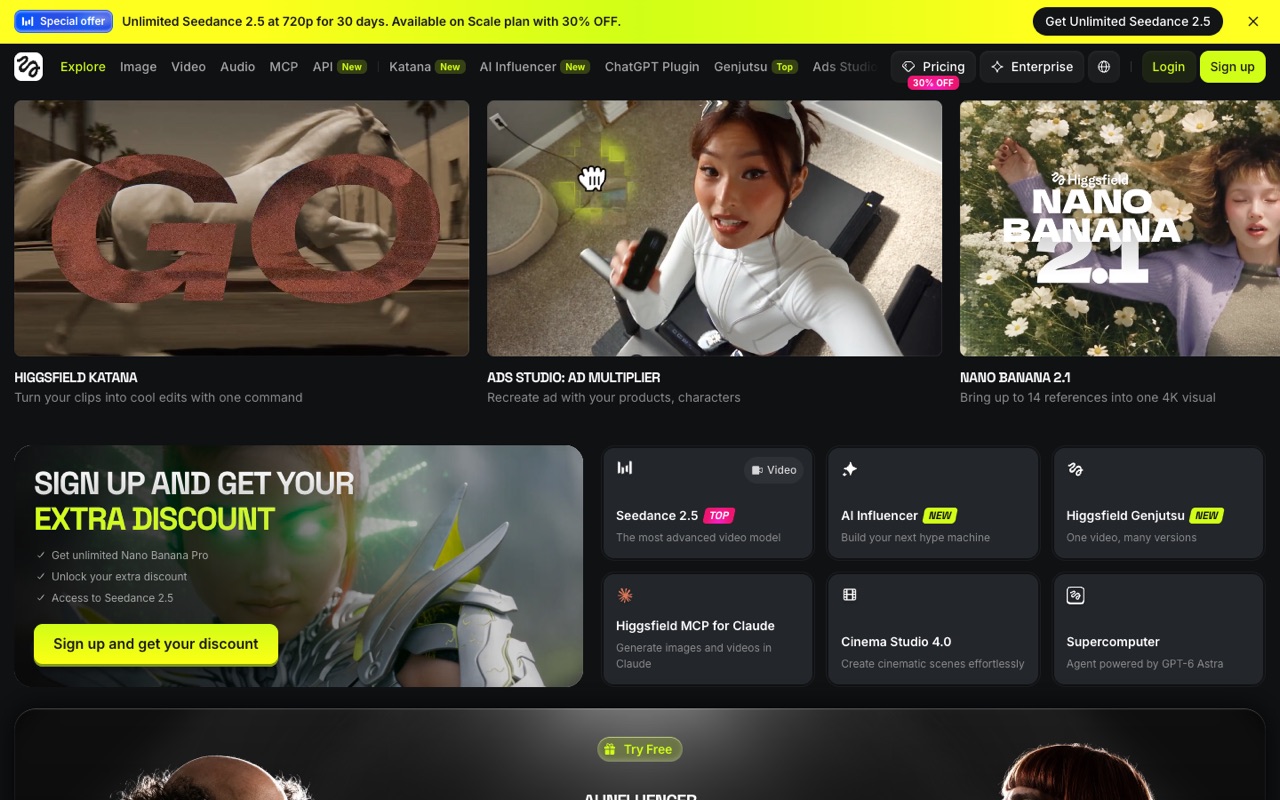
Higgsfield is an AI video and image studio that bundles its own models (such as Soul and Genjutsu) with third-party ones like Kling, Seedance, Veo and Nano Banana, all paid for with monthly credits. It suits creators and marketers who want many models plus ad, character and cinematic tools in one account; skip it if you need one predictable price.
- Many models in one account. Video models such as Seedance, Kling, Veo, WAN and MiniMax sit next to image models such as Nano Banana, Flux, Seedream and GPT Image, plus Higgsfield's own Soul models. Each costs a set number of credits, and the line-up changes often.
- Cinema Studio. A workspace for building cinematic video scenes, at version 4.0 on the homepage in November 2026. Unlimited-model perks don't cover it.
- Marketing and Ads Studio. Makes product ads and marketing videos; the Ad Multiplier recreates an ad with your own products and characters. Higgsfield Genjutsu turns one upload into many versions.
- AI Influencer and Soul ID characters. Build a consistent character or AI influencer persona and reuse it across images and clips. Paid plans include a monthly number of character generations.
- Shorts Studio and Lipsync Studio. Create or recreate short-form videos with your character, voice and style, and sync speech to a face. Higgsfield Speak is on Plus and Ultra only.
- Editing tools. An AI video editor, Katana (edits your clips from one text command), upscaling, inpainting, face swap and image editing.
- Supercomputer agent. An AI agent that plans and runs multi-step jobs. It runs on credits, including for text requests, and shows the credit cost before a job renders.
- MCP, CLI and API. Generate from Claude through the Higgsfield MCP, from a command line, or from your own code via the developer API at console.higgsfield.ai. These run on credits; unlimited-model perks apply on higgsfield.ai only.
Who is Higgsfield for?
Higgsfield is a good fit if you're a video creator or a business owner, and you need help making videos and images.
How much does Higgsfield cost?
Not confirmed for the US. Higgsfield's pricing page is built in the browser and has shown different plan line-ups and prices on different visits (Basic/Pro/Max in some layouts, Starter/Plus/Ultra in others), and reviews from June to October 2026 report different numbers. We'd rather not print a price we couldn't confirm, so check higgsfield.ai/pricing for the price in your country. Paid plans are billed in credits, subscription credits don't roll over, and prices exclude VAT.
Higgsfield pros and cons
What stands out
- Many leading video and image models behind one subscription, so you don't need separate accounts
- Credit costs are listed per model, so you can estimate how many clips a plan gives you
- Ad, character, short-form and cinematic tools on top of plain text-to-video
- Team and Scale plans pool credits in a shared workspace, and Scale adds SSO and per-member spend control
- MCP, CLI and an API let you generate from Claude, scripts or your own app
Watch out for
- Prices are hard to pin down: the pricing page loads in the browser, varies by country and Higgsfield's own pages list different numbers
- Unused subscription credits expire each cycle, and credit packs expire after 90 days
- Starter only gets selected models and misses Start & End Frame, Higgsfield Speak and the UGC builder
- 'Unlimited' models are time-limited windows on named models, work only on higgsfield.ai and exclude Cinema Studio, MCP, CLI, Canvas and Supercomputer
- The free plan has no monthly credits, a small set of models and no commercial use
- Refunds are narrow: only a first purchase within 7 days with no credits used, minus a fee of up to 6%
Based on Higgsfield's own pages, not hands-on testing.
What are the alternatives to Higgsfield?
We list 8 other AI Video & Image tools: HeyGen, invideo AI, Luma AI, Magnific, OpusClip, Pika, Runway, Synthesia. Each one below shows its starting price and when you might pick it instead.
 HeyGen · From $24/mo
Choose HeyGen if you'd like a second option to compare for making videos and images.
 invideo AI · From $10/mo per seat
Choose invideo AI if you'd like a second option to compare for making videos and images.
 Luma AI · From $25/mo
Choose Luma AI if you'd like a second option to compare for making videos and images.

 OpusClip · From $14.5/mo
Choose OpusClip if you'd like a second option to compare for making videos and images.

 Runway · From $12/mo
Choose Runway if you'd like a second option to compare for making videos and images.
 Synthesia · From $14/mo
Choose Synthesia if you'd like a second option to compare for making videos and images.
Compared in
Higgsfield FAQ
How much does Higgsfield cost?
We couldn't confirm a US price on Nov 9, 2026. The pricing page showed no numbers from a US server, and Higgsfield's own blog (Oct 24) and pricing guide (updated Nov 5) list different Starter and Plus prices. Check higgsfield.ai/pricing for the price in your country. Plans are monthly credit allowances, with lower per-month rates if you pay yearly upfront.
Is there a free plan?
Yes, but it's small. Higgsfield's pricing post (Oct 24, 2026) says Free gives limited use of a few image models (such as Nano Banana Pro and FLUX.2 Pro) and one character generation, with no monthly credits and no commercial use.
Do Higgsfield credits roll over?
No. Unused subscription credits don't roll over: monthly plans refresh on the billing date and annual plans refresh every 30 days. Credit packs and auto-refill credits expire 90 days after purchase.
What does 'unlimited' mean on Higgsfield?
It's unlimited use of named models for a set window (for example 7 or 365 days), not everything. It works only on higgsfield.ai while your subscription is active, and it doesn't cover Cinema Studio, MCP, CLI, Canvas or the Supercomputer agent, which all use credits.
What's the difference between Starter, Plus and Ultra?
Credits, models and speed. Starter gets selected models and runs 2 video jobs at once. Plus and Ultra open every model, add Start & End Frame, Higgsfield Speak and the UGC builder, and run 6 and 8 video jobs at once. Ultra has the most credits.
Does Higgsfield have a team plan?
Yes. Team is for 2–9 seats with 1,000 credits per seat in a shared pool. Scale is for 5–15 seats with 2,500 credits per seat, SSO and a way for admins to pause a member's spending. Enterprise is custom; Higgsfield says it excludes customer inputs and outputs from model training.
Can I get a refund?
Only in a narrow case. Higgsfield's pricing guide (updated Nov 5, 2026) says a first purchase can be refunded within 7 days if none of its credits were used, minus a service fee of up to 6%. Renewals aren't covered, and cancelling only stops auto-renewal. EEA and UK consumers have a separate 14-day withdrawal right.
Is Higgsfield worth it?
We haven't tested Higgsfield ourselves. On paper it suits people who want to try many video and image models without separate subscriptions, and who value its ad and character tools. If you need a fixed, easy-to-compare price or credits that carry over, compare Runway or Pika first.
Sources and how we checked
- Official pricing page, checked Oct 12, 2026
- Official website
- Higgsfield homepage (checked Nov 9, 2026), checked Nov 9, 2026
- Higgsfield blog: Higgsfield Pricing Explained (Oct 24, 2026; checked Nov 9, 2026), checked Nov 9, 2026
- Higgsfield AI Pricing and Plans: The Complete Guide (updated Nov 5, 2026; checked Nov 9, 2026), checked Nov 9, 2026
- Higgsfield blog: Credits vs Unlimited Plans for AI Video Generation (Sep 11, 2026; checked Nov 9, 2026), checked Nov 9, 2026
- Higgsfield blog: 7 AI Video Team Plans Compared (Nov 4, 2026; checked Nov 9, 2026), checked Nov 9, 2026