
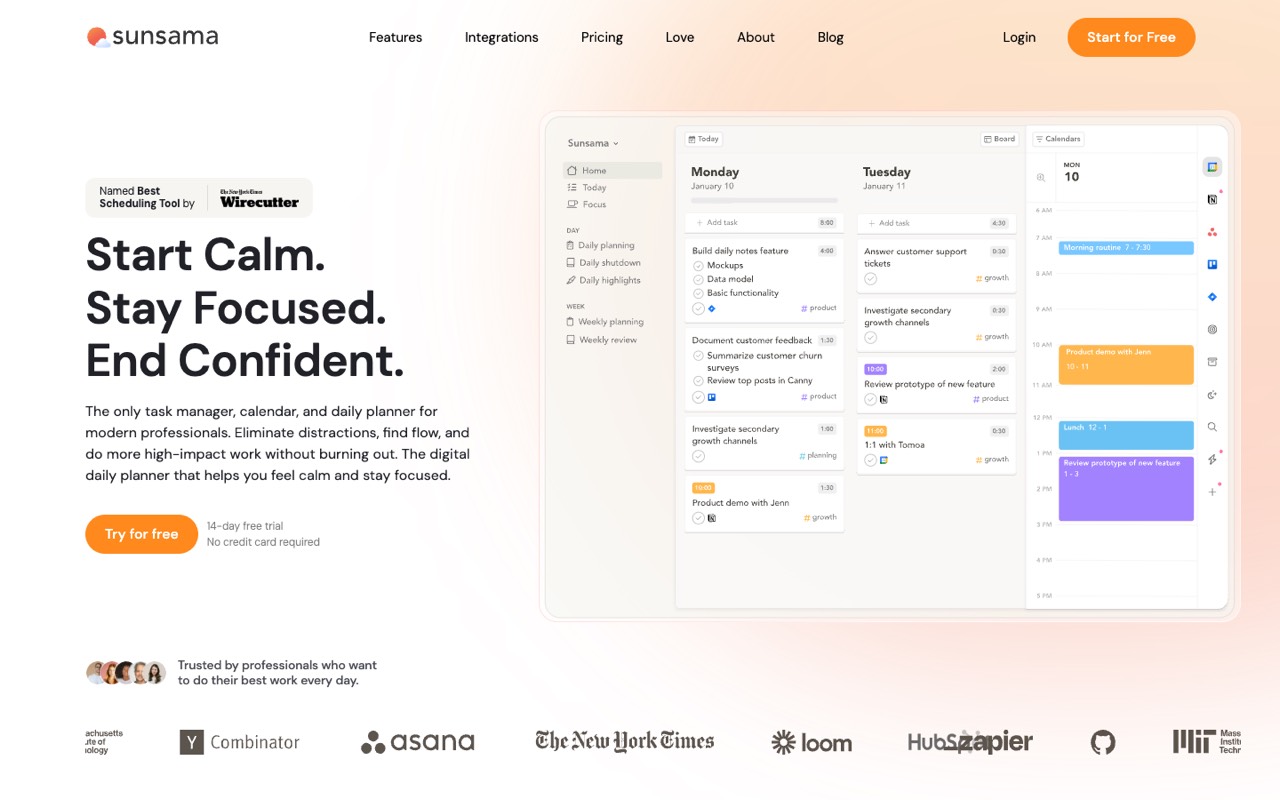
What does Sunsama do?
Sunsama is a daily planner that brings your tasks and calendar into one place. Each morning it walks you through choosing what to work on, estimating time and dragging tasks onto your calendar (timeboxing). It pulls tasks from tools like Asana, Todoist, Trello, Gmail and Slack, and ends the day with a shutdown ritual so you stop on time.
- Guided daily planning. A morning routine to pick tasks, set a realistic workload and choose your priorities.
- Timeboxing. Drag tasks onto Google, Outlook or Apple calendars to block time for them.
- Focus tools. Focus Mode, app muting, break reminders and Pomodoro timers.
- Shutdown ritual. A daily reminder to wrap up, review what you finished and stop work on time.
- Weekly goals. Set and track weekly goals alongside daily tasks.
- Integrations. Asana, ClickUp, Jira, Linear, Notion, Todoist, Trello, Gmail, Outlook, Slack, Microsoft Teams, Zapier and more.
Who is Sunsama for?
Sunsama is a good fit if you're a team lead or a business owner, and you need help planning my day and projects.
How much does Sunsama cost?
Sunsama starts at $17/mo. It has no free plan. Its pricing page lists a free trial. We checked this on Oct 15, 2026 on the official pricing page.
- Starts at
- $17/mo
- Free plan
- No
- Free trial
- 14 days, no card
Pro billed yearly ($22/mo billed monthly) per the pricing table, with unlimited usage and integrations. The same page's FAQ still says $25/mo ($20 yearly) per person, so check before buying. No free plan.
Sunsama plans compared
| Plan | Billed monthly | Billed yearly | What you get |
|---|---|---|---|
| Pro | $22/mo | $17/mo | Unlimited usage and integrations; AI, MCP and Zapier included |
| Enterprise | Not listed | Custom | SSO and SAML, SCIM, audit logs, custom privacy and data terms; contact support |
Prices from the pricing table on 15 Oct 2026, read from a US connection. The same page's meta description and FAQ still say '$25/month per person ($20/month for yearly plans)', so confirm the price at checkout. Sunsama says it has no free plan and doesn't plan to add one. The 14-day trial needs no credit card.
Checked Oct 15, 2026 on Sunsama's pricing page. Prices change often, so confirm before you buy.
Sunsama pros and cons
What stands out
- Pulls tasks from many apps into one daily list
- Calm, guided planning routine
- Apps for web, macOS, Windows, Linux, iOS and Android
- 14-day trial without a card
Watch out for
- No free plan
- Pricing table and FAQ show different prices
- AI features are barely described on the homepage
- Built for personal planning more than team project tracking
Based on Sunsama's own pages, not hands-on testing.
What are the alternatives to Sunsama?
We list 13 other AI Productivity & Meetings tools: ClickUp, Consensus, ElevateForward, Evernote, MeetGeek, monday.com, Motion, Reclaim.ai, SaneBox, SmartSuite, Todoist, Wing Assistant, Wrike. Each one below shows its starting price and when you might pick it instead.


 ElevateForward · From $250/mo
Choose ElevateForward if you'd like a second option to compare for planning my day and projects.






 SmartSuite · From $15/seat/mo
Choose SmartSuite if you want a lower starting price ($15/seat/mo vs $17/mo).



Compared in
Sunsama FAQ
How much does Sunsama cost?
On 15 Oct 2026 the pricing table showed Pro at $22 a month or $17 a month billed yearly. The FAQ on the same page said $25 ($20 yearly), so check at checkout.
Does Sunsama have a free plan?
No. Sunsama offers a 14-day free trial with no credit card, and says it has no free-forever plan.
What does Sunsama integrate with?
Calendars (Google, Outlook, Apple), task tools such as Asana, Todoist, Trello, Jira and Notion, Gmail and Outlook email, Slack, Microsoft Teams and Zapier.
Sources and how we checked
- Official pricing page, checked Oct 15, 2026
- Official website
- Sunsama homepage, checked Oct 15, 2026