
What does VEED do?
VEED is a browser-based AI video platform: an editor with auto subtitles, translation and dubbing, plus AI video generation, avatars, voice tools and a brand kit. There's a free plan with watermarked exports, paid plans are billed per seat, and Enterprise is custom. Skip it if you need a confirmed US price before you sign up.
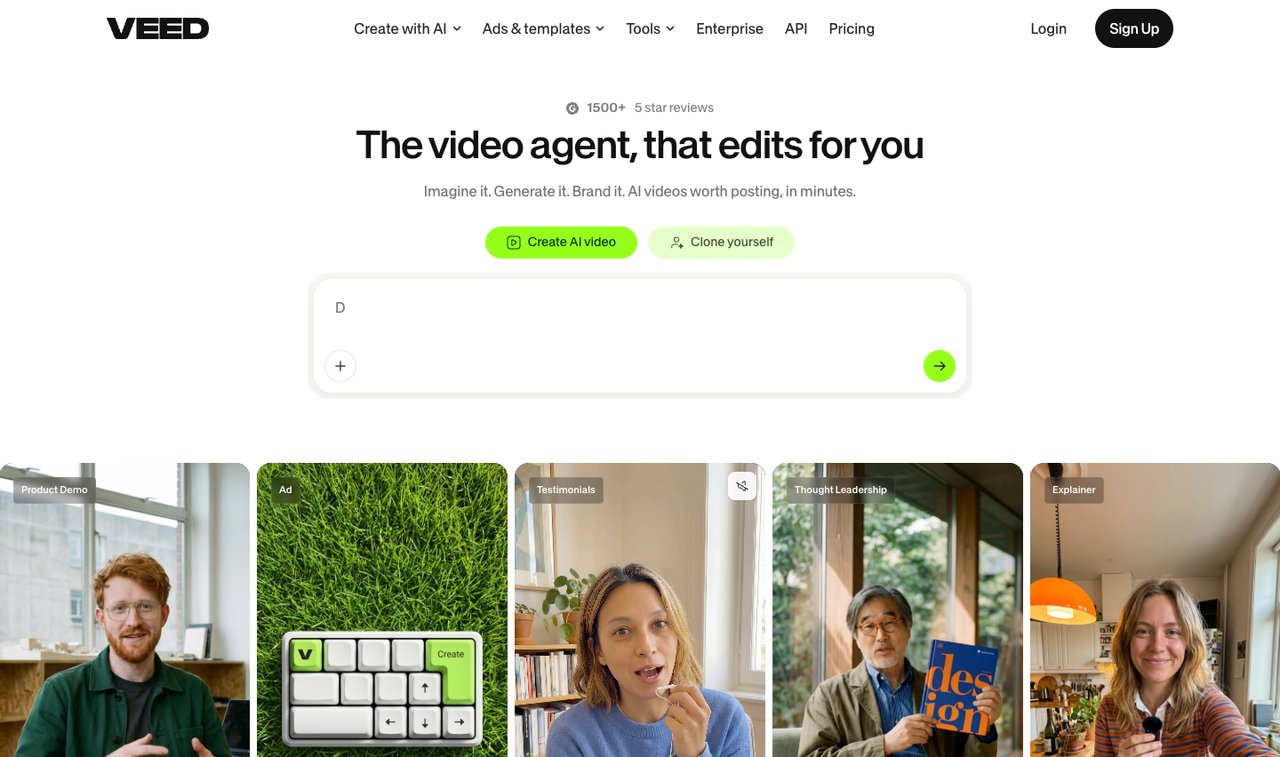
- Online video editor and AI agent. A browser-based editor with an AI video editor, an AI editing agent and an AI clip generator. The homepage pitches it as "the video agent, that edits for you".
- Auto subtitles and captions. Auto subtitle and caption generators with subtitle styles and downloadable subtitles. Paid plans list unlimited subtitle generation, subject to a fair-use limit of 50 hours a month.
- Translation and AI dubbing. A video translator and AI dubbing; Pro lists translation into 50+ languages. Translation minutes count against your plan allowance and don't roll over.
- AI video and image generation. Text-to-video and image-to-video with third-party models the site names, such as Sora 2, Veo 3.1 and Kling, plus VEED's own Fabric 1.0. Generations spend AI credits; an AI image generator, editor, upscaler and background remover are also listed.
- AI avatars and voice. AI avatars and a "Clone yourself" option, an AI voice generator, voice cloning, text to speech, an AI music generator and audio cleanup that removes background noise.
- Brand kit and templates. Store brand colors, fonts, logos, watermarks and media to reuse across projects; Pro lists multiple brand kits. There's also a video ad maker, AI UGC ads, templates and a social banner maker.
- Recording and transcription. Screen and webcam recorder, an online teleprompter, eye-contact correction and audio/video-to-text transcription, alongside video converters and compressors.
- Video APIs. Developer APIs listed on the site include the Fabric 1.0 API, a lip-sync API, a subtitle API, background removal, green screen and clean audio APIs.
Who is VEED for?
VEED is a good fit if you're a video creator, a business owner or a team lead, and you need help making videos and images or making ads and marketing assets.
How much does VEED cost?
Free plan; videos made on it carry a VEED watermark. Creator and Pro are paid per seat, monthly or yearly, with AI credits (Creator 6,000 a year on yearly billing or 500 a month on monthly; Pro 18,000 a year or 1,500 a month), no watermark and unlimited auto subtitles; Enterprise is custom. On Nov 26, 2026 the plan cards load with JavaScript and showed no prices to our US-based check, and VEED says it lists prices in local currency where available, so we don't list a figure. A Black Friday banner offered 30% off annual plans.
VEED pros and cons
What stands out
- Free plan to start, with paid plans removing the watermark
- Editing, subtitles, translation, dubbing and AI generation in one browser tool
- Paid plans list unlimited auto subtitles (50 hours a month fair use)
- Offers third-party video models such as Veo 3.1 and Kling alongside its own Fabric 1.0
- Brand kit with fonts, colors, logos and watermarks; Pro adds multiple brand kits
- Developer APIs for lip sync, subtitles and background removal
Watch out for
- No plan prices showed to our US-based check; the page shows prices by location
- Paid plans are charged per seat, so costs grow with each editor you add
- AI credits and translation minutes don't roll over
- Free-plan videos carry a VEED watermark
- A free trial is offered only to Enterprise customers with at least 3 users
- Multiple brand kits, translation into 50+ languages and the larger AI voice allowance start at Pro
Based on VEED's own pages, not hands-on testing.
What are the alternatives to VEED?
We list 17 other AI Video & Image tools: AKOOL, HeyGen, Higgsfield, Hyper3D (Rodin), invideo AI, Klap, Luma AI, Magnific, OpenArt, OpusClip, Pictory, Pika, PixVerse, Runway, Submagic, Synthesia, Vizard. Each one below shows its starting price and when you might pick it instead.
 AKOOL · From $12/mo
Choose AKOOL if you'd like a second option to compare for making videos and images.
 HeyGen · From $24/mo
Choose HeyGen if you'd like a second option to compare for making videos and images.
 Higgsfield · Price not checked
Choose Higgsfield if you'd like a second option to compare for making videos and images.
 Hyper3D (Rodin) · From $24/mo
Choose Hyper3D (Rodin) if you'd like a second option to compare for making videos and images.
 invideo AI · From $10/mo per seat
Choose invideo AI if you'd like a second option to compare for making videos and images.
 Klap · From $14.50/mo
Choose Klap if you'd like a second option to compare for making videos and images.
 Luma AI · From $25/mo
Choose Luma AI if you'd like a second option to compare for making videos and images.
 Magnific · From $14.50/mo
Choose Magnific if you'd like a second option to compare for making videos and images.
 OpenArt · From $14/mo
Choose OpenArt if you'd like a second option to compare for making videos and images.
 OpusClip · From $14.5/mo
Choose OpusClip if you'd like a second option to compare for making videos and images.
 Pictory · From $29/mo
Choose Pictory if you'd like a second option to compare for making videos and images.

 PixVerse · Price not checked
Choose PixVerse if you'd like a second option to compare for making videos and images.
 Runway · From $12/mo
Choose Runway if you'd like a second option to compare for making videos and images.
 Submagic · From $12/mo
Choose Submagic if you'd like a second option to compare for making videos and images.
 Synthesia · From $14/mo
Choose Synthesia if you'd like a second option to compare for making videos and images.
 Vizard · Price not checked
Choose Vizard if you'd like a second option to compare for making videos and images.
Compared in
VEED FAQ
How much does VEED cost?
VEED has a free plan, two paid self-serve plans (Creator and Pro) billed per seat, monthly or yearly, and custom-priced Enterprise. On Nov 26, 2026 no plan prices showed to our US-based check, and VEED says prices are listed in local currency where available, so check veed.io/pricing for your country.
Is VEED free?
Yes, there's a free plan you can start from the pricing page. Videos created on it carry a VEED watermark in the corner; any paid plan removes it. The free plan's exact allowances weren't shown on the plan cards we could read.
What's the difference between VEED Creator and Pro?
Creator includes 6,000 AI credits a year on yearly billing (500 a month on monthly), no watermark, unlimited auto subtitles and 15+ AI tools. Pro triples the credits (18,000 a year or 1,500 a month) and adds multiple brand kits, translation into 50+ languages and up to 144 hours a year of AI voice.
How do VEED AI credits work?
Each plan includes a set number of AI credits per month or year to spend on AI generations such as text-to-video. The allowance refreshes when your subscription renews, unused credits don't carry over, and you can move to a higher credit allowance if you need more.
Does VEED charge per user?
Yes. VEED says its plans are charged per seat, so the plan price is multiplied by the number of editors in your workspace, and you're charged when you invite new users.
Does VEED offer a free trial?
VEED's FAQ says it offers a free trial for enterprise customers, with a minimum of 3 users, set up through sales. For individuals, the free plan is the way to try it.
Does VEED have an affiliate program?
Yes. Its affiliate page offers a 20% initial commission on each sale plus 20% recurring commission, with bonus commissions of up to 50% as you grow. It runs on Impact and pays monthly by bank transfer, PayPal or wire. The page doesn't state a cookie length or how long recurring commission lasts.
Is VEED worth it?
It suits creators and marketing teams who want editing, subtitles, translation and AI generation in one browser tool and are fine paying per seat. If you only need clipping or captions, a narrower tool may cost less. We haven't tested it hands-on; this is based on VEED's official pages.
Sources and how we checked
- Official pricing page, checked Nov 26, 2026
- Official website
- VEED homepage: AI video, editing, voice and API features (checked Nov 26, 2026), checked Nov 26, 2026
- VEED affiliate program (checked Nov 26, 2026), checked Nov 26, 2026